Network Documentation Workbook
Network Documentation Template Spreadsheet, Device Inventory, Port Map, Circuit List and Change Log for Network Engineers
- Device inventory with unique IDs
- Port map linked to each device
- Circuit list with demarc links
- Change log and live overview
- Worked two-site sample included
What you get
- network-documentation-workbook.xlsxExcel workbook · 103 KB
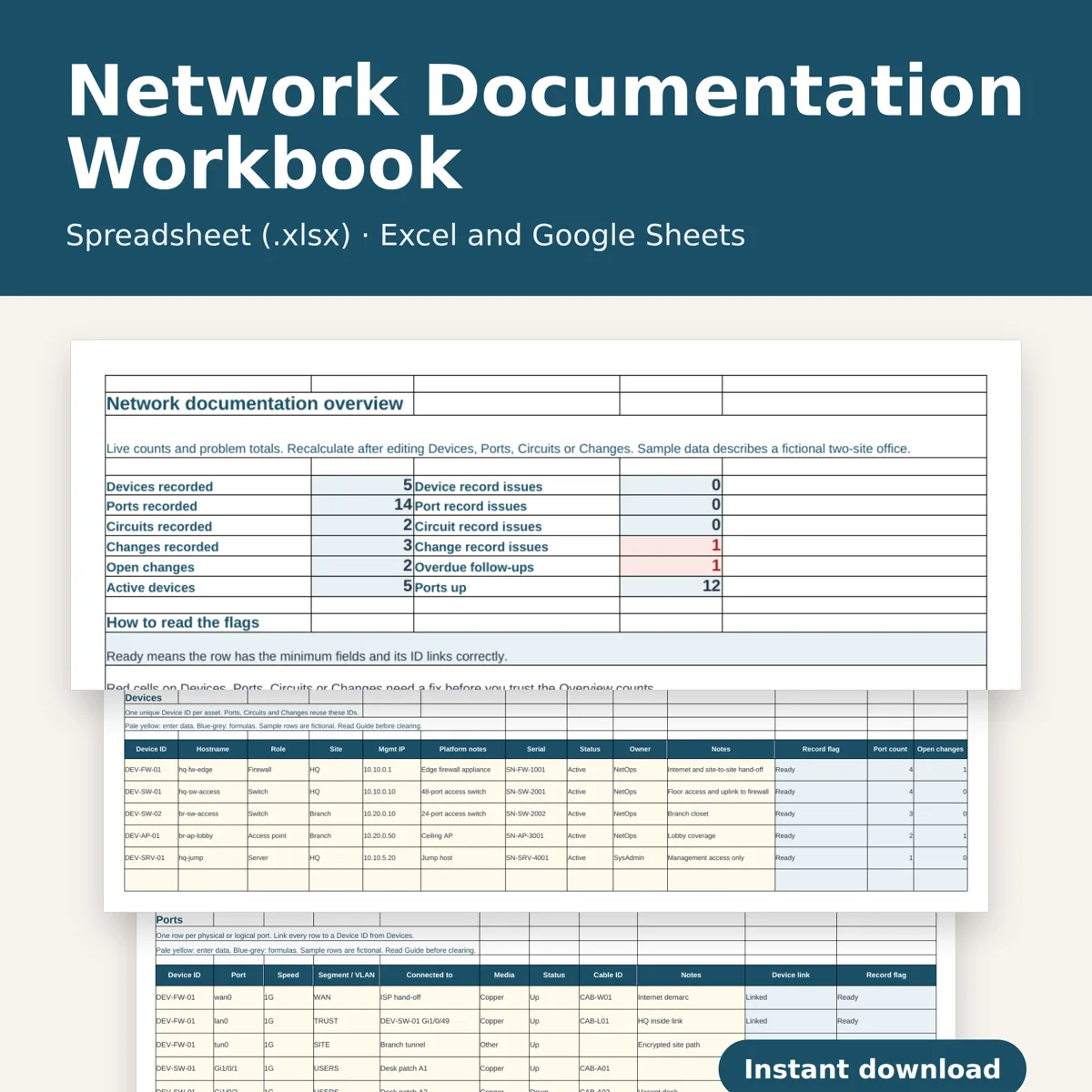
Keep your network records in one offline workbook. Link device inventory, switch and firewall port maps, WAN and circuit details, and a change log so every row points back to the same device and circuit IDs.
What you download
One .xlsx workbook with six tabs: Overview, Devices, Ports, Circuits, Changes and Guide. Opens in Excel 2010 or later, Google Sheets and LibreOffice Calc. Standard formulas only: no macros, no add-ins, and nothing connects to your network. English. Digital download only; no physical item ships.
Inside
- Devices, 150 rows: device ID, hostname, role, site, management IP, platform notes, serial, status, owner and notes. Duplicate IDs and incomplete records are flagged - Ports, 400 rows: each port links to a device ID, with port name, speed, segment or VLAN label, far-end connection, media, status and cable ID. Unknown or duplicate device IDs are flagged - Circuits, 100 rows: circuit ID, service type, bandwidth, A-end and Z-end sites, demarc device, provider reference and status. Linked demarc devices are checked against the inventory - Changes, 200 rows: change ID, date, linked device and/or circuit, change type, summary, implementer and status. Open and overdue follow-ups stay visible on the Overview - Overview: live counts of devices, ports, circuits and open changes, plus problem totals from every log - Guide: how to clear the sample, assign IDs and review flags
How it works
Pale yellow cells are for typing; blue-grey cells calculate. The sample shows a small two-site office so you can see the links working. Clear the yellow sample cells and keep the formula columns before entering your own network. Vendor-neutral: it suits any make of switch, router, firewall or access point.
This is a documentation and inventory tool for your own use or your organization's internal use. It does not discover devices, push configurations or provide design advice. Do not resell or redistribute the file. Designed by seller.
Designed by OEFR Digital with AI assistance. Every formula is checked before listing.
Designed by OEFR Digital with AI assistance. Every formula is checked before listing.